

Glossary
Sessionboard uses a handful of words in a specific way. Each term here gets a sentence or two and a link to the article that goes deeper. If a word you hear from our team is missing, tell us at support@sessionboard.com.
Why use it
Section titled “Why use it”Some words mean something specific in Sessionboard, such as the difference between a submission and a session, or between an event field and a global field. Look a term up here when an article, the sidebar or someone on the Sessionboard team uses it and you want to be sure. Each definition links to the article that covers it, so the glossary also works as a way into a feature when you know its name but not where it lives.
Where things live
Section titled “Where things live”Organization — the container for everything your company or association runs on Sessionboard. Events live inside it, and so do the things you share between them: contacts, global custom fields, email templates, your team, the Speaker CRM and Awards. Find your way around the sidebar
Event — one conference, program or awards cycle, with its own dates, forms, sessions, speakers, agenda and portals. Most of your day-to-day work happens inside an event. Event details
Module — a group in the left sidebar: Program, CRM, Marketing, Publish, Awards, Portals, Communications, Automations, Reporting, Agents, Event Team, Settings and Apps. The Help Center’s sidebar mirrors them. Get started by module
Dashboard — the first page of an event: what needs attention, upcoming deadlines, recent activity, and pinned shortcuts. Event dashboard
The program
Section titled “The program”Submission — what arrives through a submission form: an abstract or session proposal with the people on it, and the files that came with it. A submission becomes a session when you accept it, or it can be a session from day one. Submission forms
Session — a talk, panel, workshop, poster or any other slot in the program, with its participants, fields, files and a place on the agenda. Create a session
Subsession — a session nested inside another, for a symposium with several talks or a track block. Create a subsession
Participant roles — the roles a person can hold on a session: Submitter (who sent it in), Speaker, Chairperson and Moderator. One person can hold several; each role has its own fields and portal view. Session participant roles
Contact — a person on the event, in any role. The same person is one contact across every event in the organization, so a bio or headshot updated once follows them. Contact profile
Participant — a contact who holds a role on a session or in a portal: a speaker, chairperson, moderator or submitter. “Participant” is about the program; it is not the word for someone in the audience. Session participant roles
Attendee — a person who registers for or comes to the event. Attendees answer surveys and share through Advocacy. They are not contacts in your CRM unless you add them.
Account — a company in the Speaker CRM: the organization a speaker or prospect belongs to. It is not your Sessionboard organization. Speaker CRM
Prospect — a speaker you have not booked yet, as a card in the CRM pipeline. Pipeline
Program settings — your event’s vocabulary: tracks, formats, rooms, levels, tags, session statuses and roles. Set it before you build forms, because every form and filter uses it. Program settings
Agenda — the schedule: sessions placed in rooms and time slots, with conflict alerts, drag-and-drop and a public view. Agenda
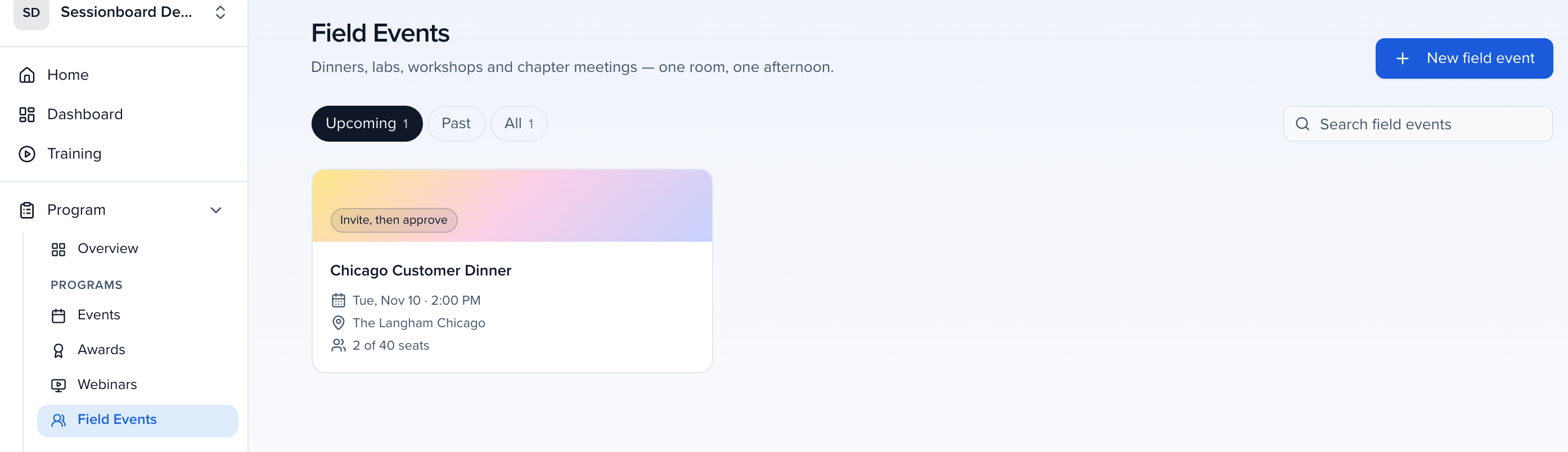
Field Events — small in-person programs such as dinners, labs, workshops and chapter meetings, listed under Program → Field Events (called Gatherings before October 2026). Field Events
Submission form — the call for papers: how proposals and the people on them come into an event. Submission forms
Application form — a form a person fills in about themselves rather than about a session — speaker, volunteer or scholarship applications. Create applications
Portal form — a form you assign inside a portal to collect something later: a headshot, an agreement, AV needs. Create and assign forms
Interest form — a standing “speak with us” page at the organization level; submissions land in the CRM pipeline rather than on an event. Part of Speaker CRM. Interest forms
Which form should I use? — the one-page comparison of every form kind. Which form should I use?
Fields
Section titled “Fields”Standard field — a field Sessionboard provides on every record: title, description, name, email, company. Sessionboard standard fields
Custom field — a field you add: CE credits, dietary needs, a LinkedIn URL. Each has a type (text, dropdown, file, URL, formula…) that decides what it can hold. Create and delete custom fields · Custom field type reference
Event field vs. global field — an event field exists only on that event; a global field’s data follows the record across every event in the organization. Organization-level fields are always global. Field types: session, people & group
Field rule — formats text, calculates into an editable field, or sets fields when values match. Create a field rule
Review: scoring submissions
Section titled “Review: scoring submissions”Sessionboard uses review for the committee work of scoring submissions before the program is set, and survey for what attendees tell you about sessions and speakers during or after the event. Some notification names, the reviewer invitation email and a few review portal messages still say “evaluation” or “evaluator”; they mean review and reviewer.
Review plan — the rules for one review process: who reviews what, how many submissions each reviewer takes, what they score, and in which rounds. Written once, applied to every submission in scope. Set up a review plan
Reviewer — a person invited to score submissions. Reviewers work in their own review portal, not in the admin, and see only what the plan assigns them. In Awards the same word applies: reviewers, not judges. Review sessions
Round — one pass of review. A plan can run several rounds — a first cut, then a committee or chair round — each with its own reviewers, criteria and dates. Rounds
Assignment — the pairing of one submission with one reviewer. A plan assigns everything to everyone, to named reviewers, or by matching reviewer expertise to tracks and tags, with optional caps per reviewer and per submission. Set up a review plan
Review portal — where a reviewer signs in to see their queue, score, comment, declare a conflict of interest and abstain. Review sessions
Call for Reviewers — a public form that recruits reviewers and records their expertise, so a plan can match them to submissions. Available in Program and in Awards. Open a call for reviewers
Score and review — a reviewer’s numeric answer to a criterion is a score; the whole of what one reviewer submits on one submission is a review. Review summary
Accept / decline — the decision on a submission, with the emails and status changes that follow. Accept and decline
Status — where a submission or session is in its life (Pending, Accepted, Declined and the custom statuses you add under them). Filters on a standard status include its custom ones. Program settings
Surveys: what attendees tell you
Section titled “Surveys: what attendees tell you”Survey — a set of questions attendees answer about the event, a session or a speaker, during or after the event. Surveys live under Program alongside review, but they are a different thing: reviewers score submissions before the program exists; attendees rate sessions once it has run. Surveys
Question, response and rating — a survey is made of questions; one attendee’s answers to one survey about one target are a response; a numeric answer is a rating. The admin results roll responses up per session, speaker or event. Surveys
Participant Feedback — the view that shows speakers how attendees rated their sessions, in their portal. Shown as Speaker Feedback in some places. Participant Feedback
Portals and communications
Section titled “Portals and communications”Portal — the branded page where a speaker, sponsor or exhibitor signs in to see their tasks, update their bio and headshot, upload files and sign agreements. Each audience can have its own portal. Portals 101
Task — something you ask a participant to do in their portal by a date: upload slides, confirm travel, sign an agreement. Assign tasks
Email template — a reusable message with merge tags, shared across the organization. Email templates
Sending domain — the address your emails come from (speakers@yourconference.org rather than a Sessionboard address). Send email from your own domain
Automation — a recipe: when a field changes or a form comes in, send an email, assign reviewers or write a field. Automations
Beyond the event
Section titled “Beyond the event”Speaker CRM — the organization-level module for speakers you have not booked yet: interest forms, a pipeline board, speaker profiles across events. An add-on. What is Speaker CRM?
Pipeline — the CRM’s kanban board: prospects as cards, moved through stages, assigned to an event when confirmed. Pipeline
Awards — the add-on for awards, grants and scholarships. An awards program holds categories; a submission (a nomination when the form nominates someone else) comes in through the submission form; reviewers score in rounds; a ballot is a public vote. Getting started with Awards · Managing submissions, reviewers & rounds
Field Events — small gatherings, meetups and dinners run from your organization, with tickets, promo codes and badges. Shown as Gatherings in some screens. Early Access
Advocacy — getting your event shared: participants, sponsors, exhibitors and attendees (your event community) each share a branded card with their own tracked link from their share page, and you see what each share brought. Advocacy campaigns
Team campaign — Advocacy for your own staff (Your team under Who’s sharing it?): a schedule of posts your sales, membership or marketing team shares from their own share kit, delivered by Slack, Microsoft Teams and email, with a leaderboard. Team campaigns sit in the same Campaigns list as your event community’s. They were called Dispatch until November 2026, and a few training videos still use that name. Team campaigns
Program site / embeds / content gallery — the three ways the program appears in public: a hosted site, live embeds on your own website, and a browsable library of recordings and resources. Which surface do I need?
Agents — AI teammates inside Sessionboard. Ask (in the top bar) answers questions about your event and the product and does setup work you ask for in chat; Coordinator chases tasks and reminders; Scout finds speaker prospects; Screener pre-reads submissions on a review plan and scores them as AI personas (people review; Screener screens). “Agents” is the sidebar group; each agent has its own name. Agents overview · Ask · Screener
Ask — the conversation in the top bar of every event and organization page. It answers from your own records and the Help Center, and anything that would change your event comes back as a card for you to approve. It was called Team Lead until October 2026, and a few training videos still use that name. Ask page guide
Agent window — Ask at full screen, with a rail of your chats, dashboards and reports in place of the sidebar. Agent window
Access and availability
Section titled “Access and availability”Event team — the people who can sign in to an event, each with a role that decides what they can see and change. Invite and manage event team members
Permission — one thing a role may do (read sessions, update settings, manage users). Articles list the permission a step needs in the box under their title.
Early Access — the catalogue of features you can switch on for your organization before they are on for everyone (the row in the sidebar footer). Each feature is at one of two stages: Preview features are self-serve; Beta features you request and our team enables. Early Access
Add-on — a product sold separately (Speaker CRM, Awards, SSO, Custom Sending Domain). Your Customer Success Manager turns it on. The box under an article’s title says whether it applies.