

What the “p” in a text box means
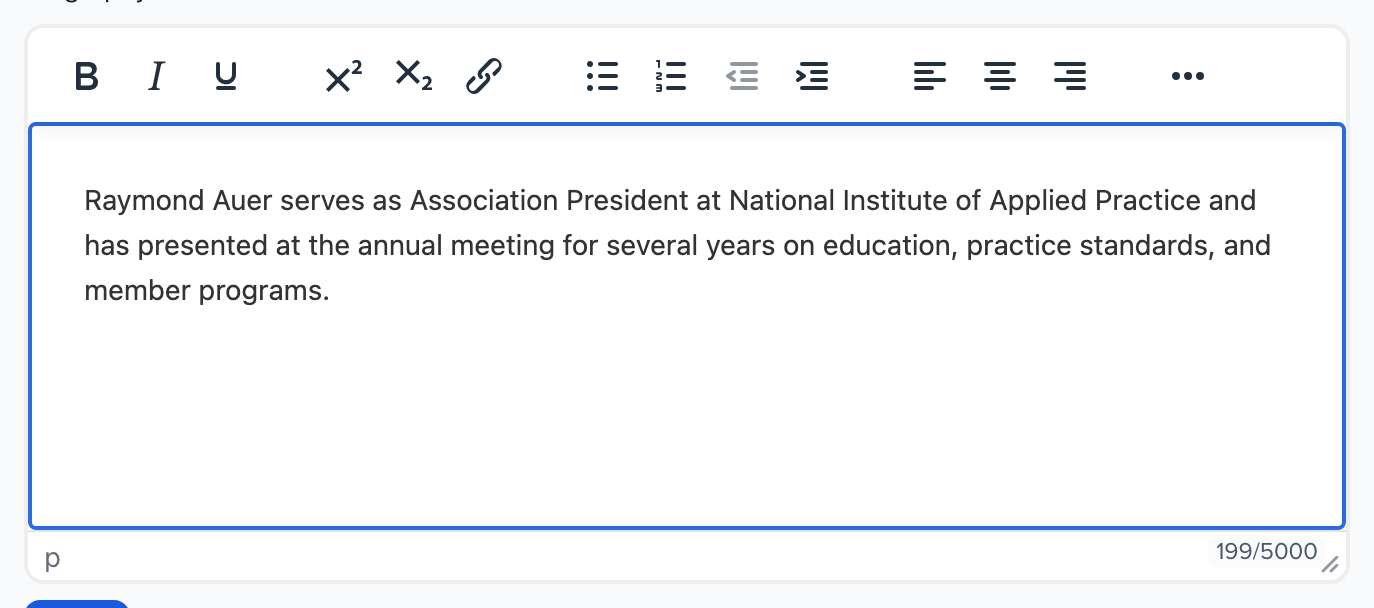
Rich text boxes — a session description or biography on a submission form, a portal form answer, the Biography field on a contact profile — have a thin status bar along the bottom. The letter at its left edge is the editor’s element path: the kind of content the cursor is currently inside.
What it means
Section titled “What it means”- p — the cursor is in an ordinary paragraph.
- p » strong — inside bold text within a paragraph.
- ul » li — inside a bulleted list item.
It changes as you move through the text. Nothing needs to be done with it.
What else is on the bar
Section titled “What else is on the bar”- When the field has a character limit, the right side shows the count, for example 199/5000. The limit is the field’s Maximum Length (how to change it) or a form-level Length Limit.
- The handle in the corner lets you drag the box taller.
Can it be removed?
Section titled “Can it be removed?”No. The status bar is part of the editor and is shown wherever the field has a limit or can be resized. The “p” is not part of your text: it is not saved with the answer and does not appear on the agenda, the speaker page or anywhere attendees look.