

Supported payment gateways
Sessionboard supports over 100 payment gateways. When adding a new gateway, you can choose from the following featured providers:
- Stripe — Cards, wallets, and bank transfers.
- Braintree — PayPal, Venmo, and cards.
- Authorize.net — Cards and eChecks.
- PayPal Commerce — PayPal, Pay Later, and Venmo.
- BluePay — Cards and ACH (Fiserv).
- BlueSnap — Cards.
These descriptions are what each provider supports, not what your submitters can pay with — see What can submitters pay with? below. Any other gateway on the full list is connected by the Sessionboard team; the Add Gateway screen says Don’t see yours? Reach out to us.
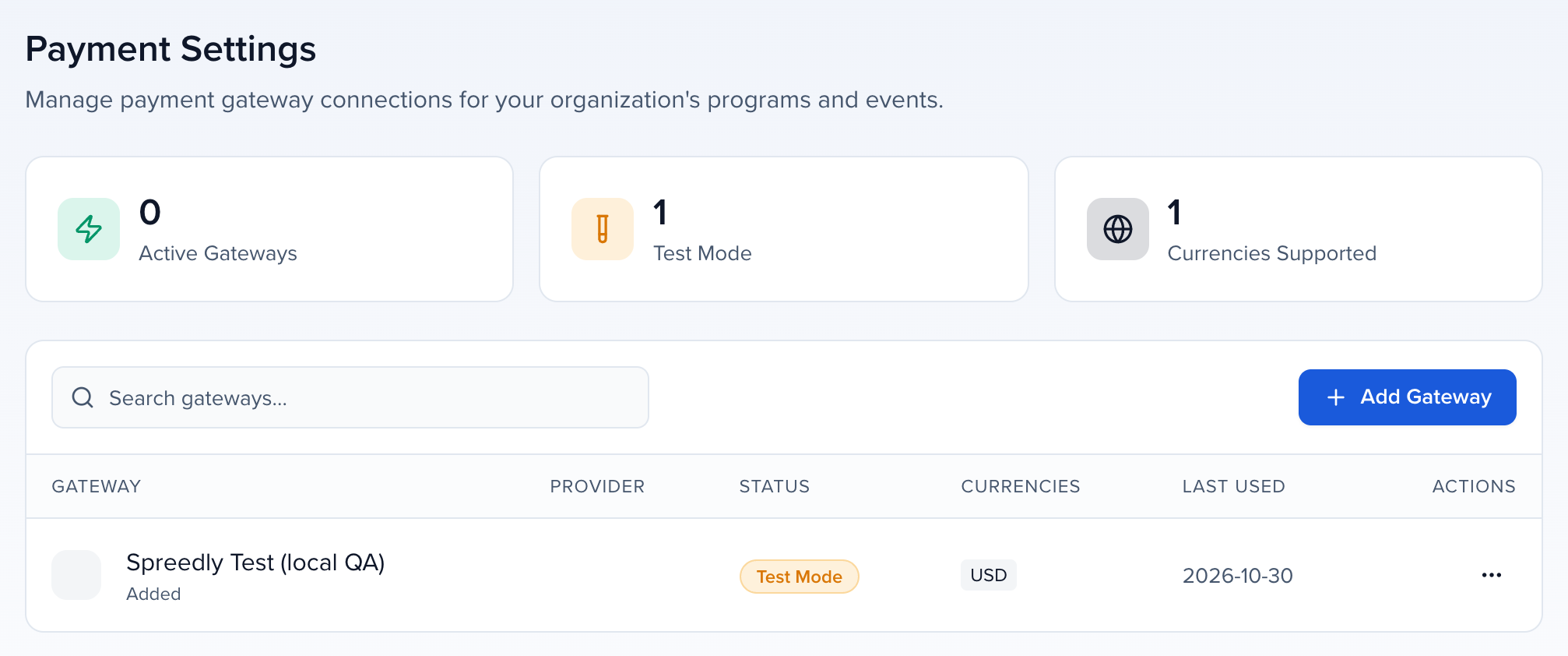
Connect a gateway under your organization’s Settings → Payment Settings → Add Gateway. The steps are in Awards pricing, payments & invoices. Payment Settings is in every organization’s settings, with or without Awards; anyone who can update organization settings can open it, and adding or changing a gateway needs the Manage payment gateways permission. The same gateways serve awards fees, submission form fees and registration.
Why use it
Section titled “Why use it”Check this list before you set up paid submissions, so you can keep using the payment processor your finance team already works with. It also tells you what submitters can pay with at checkout, and the extra settings BluePay and BlueSnap need before they take a real payment.
BluePay (Fiserv) setup
Section titled “BluePay (Fiserv) setup”BluePay asks for your 12-digit Account ID and 32-character Secret Key. In the BluePay Gateway Manager, open Administration → Accounts → List, open the account, and copy both values.
After saving the gateway, open its ⋯ menu and choose Send $1.00 test charge. Sessionboard authorizes $1.00 and voids it immediately, so nothing settles. This is the only check that reaches the processor, and it catches account settings such as the hash type that Test Connection cannot. On a live gateway, use a real card you control; some banks show the voided hold as pending for a few days.
BluePay has no separate sandbox account. Test Mode runs your existing account in BluePay’s TEST mode, where no money moves: BluePay approves odd-dollar amounts (for example $1.00 or $65.00) and declines even-dollar amounts (for example $2.00), so use an odd amount to see a successful test payment. Turn Test Mode off to take real payments.
BlueSnap setup
Section titled “BlueSnap setup”BlueSnap asks for an API Username and API Password. In the BlueSnap Merchant Portal, open Settings → API Settings, create API credentials and copy both values. The password is sent to the payment processor once and is never shown again. Sessionboard takes card payments through BlueSnap.
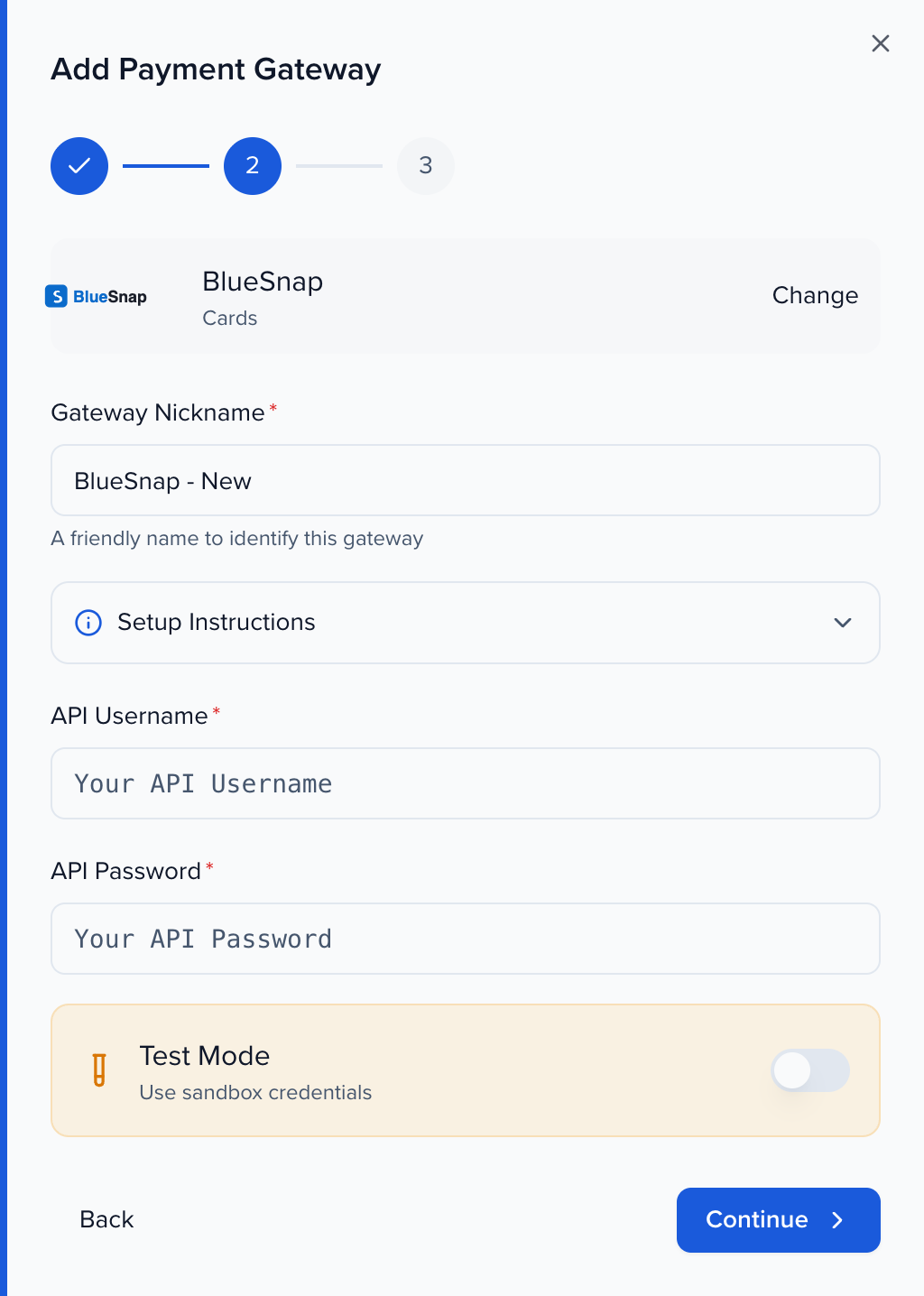
BlueSnap sandbox and production are separate accounts. Turn on Test Mode and use API credentials from sandbox.bluesnap.com to test; turn it off and use credentials from cp.bluesnap.com to take real payments. Credentials from one don’t work in the other. BlueSnap credentials aren’t checked when you save the gateway, so open its ⋯ menu and choose Send $1.00 test charge to confirm they work.
What can submitters pay with?
Section titled “What can submitters pay with?”Checkout takes credit and debit cards only, whichever gateway you connect. The payment form asks for a card number, expiry and security code; Apple Pay, Google Pay, PayPal, Venmo and bank transfers (ACH or eCheck) are not offered at checkout, even when your gateway supports them.
When a promo code brings the total to $0, checkout completes without asking for a card.
Full list of supported gateways
Section titled “Full list of supported gateways”If you need to connect another, here’s the full list of Supported Gateways:
- Acapture
- Adyen
- Airwallex
- Authorize.net
- Bambora Asia-Pacific
- Bambora North America
- Banco Sabadell
- Barclaycard Smartpay
- Barclays ePDQ Extra Plus
- BBVA (formerly CatalunyaCaixa, via Redsys)
- BluePay
- BlueSnap
- Borgun
- BPoint
- Braintree
- BridgePay
- CardConnect
- Cardstream
- CASHnet
- Cayan
- Cecabank
- CenPOS
- Checkout.com
- Clearhaus
- CommerceHub
- Conekta
- Creditcall
- CyberSource
- CyberSource REST
- Datatrans (Planet)
- Decidir
- Decidir Plus
- Diamond Mind
- DIBS
- dLocal
- EBANX
- E-comprocessing
- Elavon
- ePay
- eWAY
- eWAY Rapid
- Fat Zebra
- Fibonatix
- First Pay
- FlexFactor (FlexCharge)
- Forte
- Fortis
- Global Iris
- Global Transport
- Heartland Payment Systems
- HiPay
- iATS Payments
- IPG
- iVeri
- IXOPAY
- JetPay
- JetPay V2
- Kushki
- Latitude19
- LoanPaymentPro
- MasterCard Payment Gateway Service (formerly DataCash)
- MasterCard Payment Gateway Service (formerly MIGS)
- MasterCard Gateway (formerly TNS)
- maxiPago!
- MercadoPago
- Merchant e-Solutions
- Merchant Partners
- Merchant Warrior
- Mercury
- MIT
- Moka
- MONEI
- Moneris
- Mundipagg
- MultiPay
- NAB Transact
- NETbilling
- NetPay
- NMI
- Nomupay
- Nuvei (formerly SafeCharge)
- Nuvei REST
- Openpay
- Orbital (Chase Paymentech)
- Pay.com
- PAYARC
- PayConex
- Payeezy
- Payeezy (formerly GGE4)
- PayEx
- PayFabric
- PayFacto (formerly CT-Payment)
- Payflow Pro
- PayJunction
- Paymentez
- Paymill
- PayPal
- PayPal Commerce Platform
- Paysafe
- Paysafe (formerly Optimal Payments)
- Paystation
- PayTrace
- PayU Latam
- PayVector
- Payway
- Pin Payments
- Plexo
- PPRO
- Priority
- ProPay
- PsiGate
- Quantum
- Quickbooks
- QuickPay V10
- Qvalent
- Rapyd
- Reach
- Realex
- Redsys Rest
- S5
- Sage Payment Solutions
- SagePay
- SecureNet
- SecurePay Australia
- Shift4
- Shift4 (formerly Credorax)
- Simetrik
- SnapPay
- Spreedly Test
- Stripe
- Stripe Payment Intents
- SumUp
- TransFirst
- TransFirst Transaction Express
- TrustCommerce
- TrustPayments
- USA ePay
- Vanco
- Vantiv eCommerce (formerly Litle)
- Vantiv Express (formerly Element)
- Versapay
- VisaNet Peru
- vPOS
- VR Payment (formerly CardProcess)
- WePay
- Windcave (formerly Payment Express)
- Wirecard
- Wompi
- WorldPay
- WorldPay US
- Worldline (formerly Global Collect)
- Worldline (formerly Ogone)
- X Pay
If your preferred gateway is not listed or you need help connecting it, reach out to the Sessionboard team at support@sessionboard.com for assistance.