

Understanding a portal task
Tasks are the action items your event team assigns to you in the portal. Each task in your task list shows the same set of details.

- Task name — what you’re being asked to do (for example, “Read T&C”).
- Required — a red asterisk means the task is required.
- Task description — short instructions from your event team.
- Task due date — the date and time the task is due, in the event’s time zone. Session dates and times shown in the portal (including a session’s Starts At and Ends At) use the event’s time zone as well, not your browser’s.
- Task status — Incomplete or Complete.
Click a task to open the full task view.
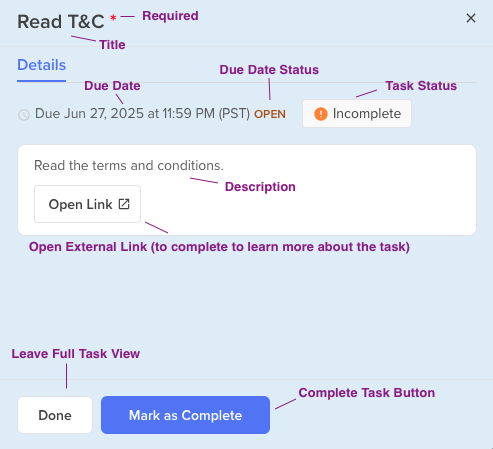
In the full task view you can see the due date and whether the deadline is still Open, read the full description, and use Open Link if your event team attached an external link to complete the task. When you’re finished, click Mark as Complete. Click Done to leave the task view without changing the status.