

Post from your team share kit
Every teammate on a team campaign gets their own share kit: one page with why the team is sharing, what to post and when, the copy ready to edit, and a button that posts it to LinkedIn with their tracked link. The Slack or Microsoft Teams message and the email only open that page. Nobody needs a Sessionboard account to use it.
Why use it
Section titled “Why use it”Sending colleagues a clip and “please share” in Slack gets a few reposts and no idea who did what. The share kit gives every teammate the same short brief, a schedule, copy they can make their own and a one-click post, and records each post against their name, so you can see who has shared and nudge only the people who have not.
How teammates get it
Section titled “How teammates get it”Each post goes out on its scheduled date, or when you click Send now:
- People get a direct message in Slack or Microsoft Teams when that app is connected and they are on it, and an email when you have their address. Both open the same share kit, so a missed message still leaves the ask in their inbox.
- Slack and Teams channels get a post that tells people to look for their own share kit in a direct message, because a channel has no personal kit.
The Slack or Teams message has one button, Open your share kit. When a post has no title of its own, the message says Your next post is ready. The email comes from you via Sessionboard (the teammate who set up the campaign), and a reply reaches you. Its subject names you and the event, for example “Josh asked you to share a post about your event”. It quotes your Why we’re sharing this under “Why your first name is asking:”, previews the post, and has one button, Open your share kit, with a plain link underneath in case the button doesn’t work. The footer says why the teammate got it and offers Unsubscribe. Neither the message nor the email carries a share link or a file of its own: posting happens from the kit, so it counts. Reminders read “Reminder from you: share a post about your event”.
If a teammate’s kit could not be created, their message tells them to ask you to resend the campaign. A post whose clip or card is still being made shows “This post’s media is still being prepared” in the kit until it’s ready.
Write the why
Section titled “Write the why”In the campaign, Why we’re sharing this is shown at the top of every teammate’s share kit, with your name. Say what the posts are for and how you would like people to post them. It is the first thing they read, so keep it to two or three sentences.
Use the share kit
Section titled “Use the share kit”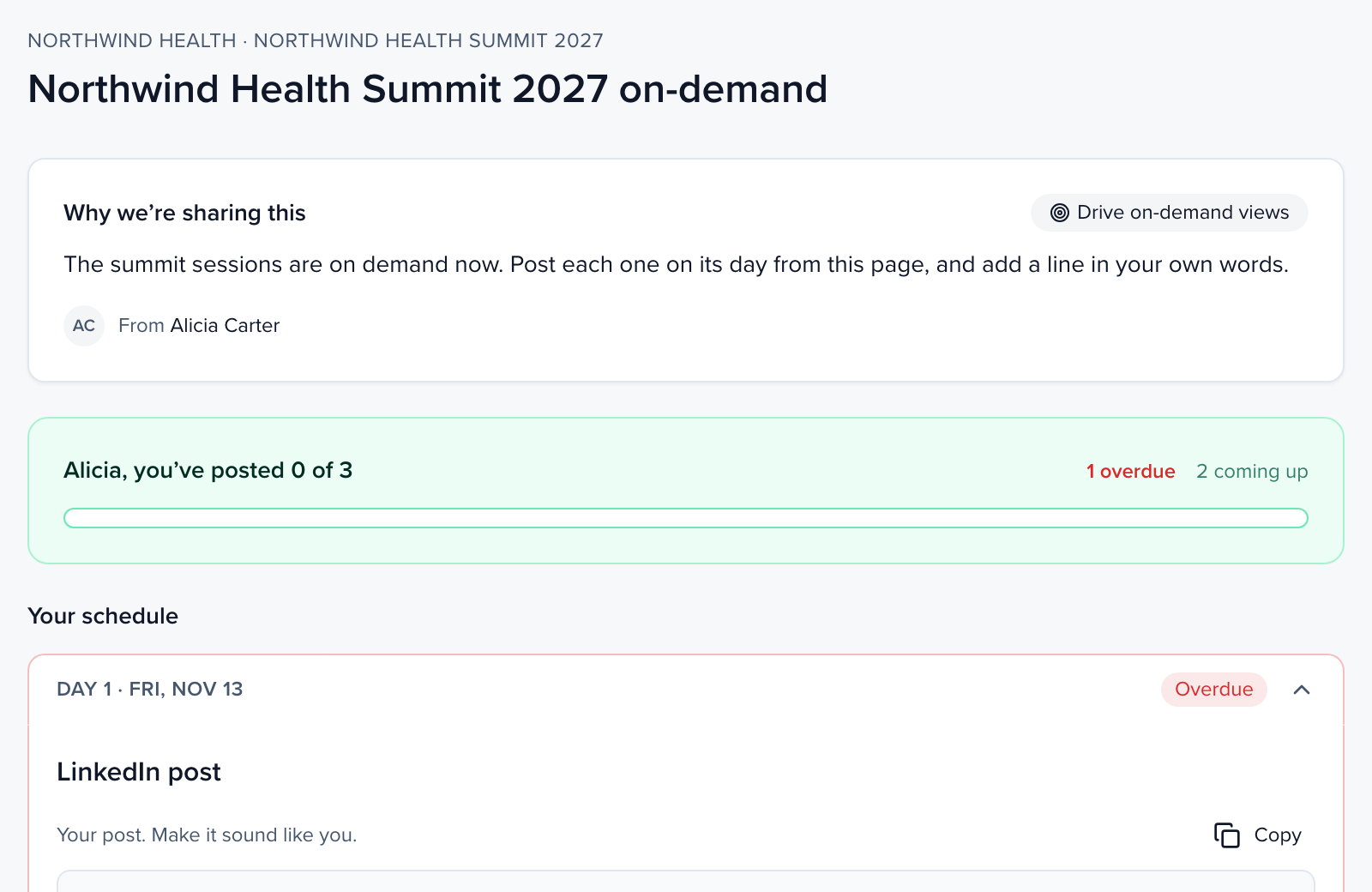
The kit has:
- Why we’re sharing this: the goal of the team campaign and the organizer’s note.
- Progress: how many posts you have made out of the total, with how many are overdue, to post now and coming up.
- Your schedule: one section per day of the plan. Days that are Overdue, to Post today or Ready to post are open; days already Posted or still to come are folded away.
- Team: who on the team has shared each post so far.
On mobile the schedule comes first and the team panel follows it.
Post an item
Section titled “Post an item”Make the copy yours
Edit Your post. Make it sound like you. The copy Sessionboard wrote is a starting point. Your tracked link is added when you post, so clicks count for you.
Post it
Click Post to LinkedIn. The first time, click Connect LinkedIn to post and approve the connection. You see You’re live with a link to your post.
Or post it yourself
Click Copy or Download clip, post it wherever you like, then click I posted it myself so it counts.
Clicking Post to LinkedIn twice never posts twice: the second click is refused while the first post is on its way. Each item shows how many teammates have posted it, and the campaign’s schedule shows the same count (for example 1/1 shared). Once you post, it shows the date and View post.
If the kit says Link not available, the link has expired or was replaced: ask the organizer to resend it.
Nudge the people who have not posted
Section titled “Nudge the people who have not posted”On the campaign, each scheduled item has a nudge. It reminds only the teammates who have not shared that item yet, over the same Slack or Teams direct message and email, with the button back to their share kit. Channels are never nudged, and each person gets at most one nudge every 12 hours: anyone nudged more recently is skipped until the 12 hours are up. A teammate who used Unsubscribe in a campaign email gets no more emails from it, and the campaign shows them as skipped.
See your own kit
Section titled “See your own kit”When you are on the recipient list of a team campaign yourself, open the campaign and click My share kit to see and use exactly what your teammates get. It never sends anything. You can only open your own kit, because a kit posts to its owner’s LinkedIn.