
Welcome to Sessionboard! 🎉
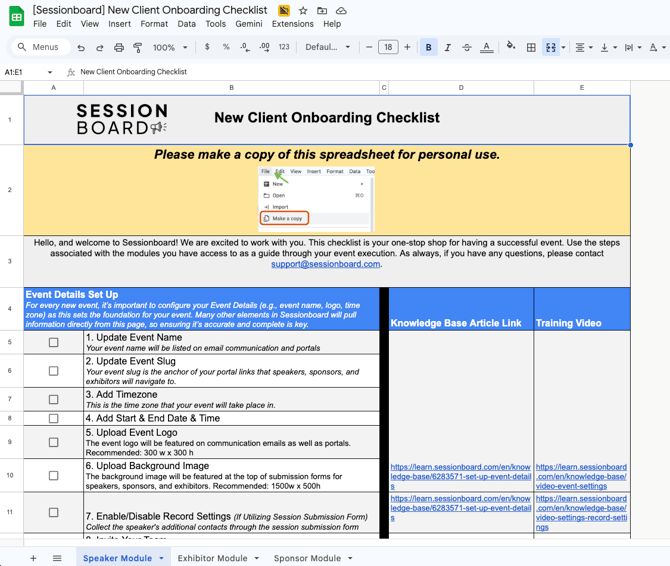
Access the Onboarding Checklist
Use the link below to access the checklist:
How to do this:
-
Open the checklist link.
-
Click File in the top navigation.
-
Select Make a copy.
This will allow your team to track progress without modifying the original template.
What the Checklist Includes
The onboarding checklist is organized by Sessionboard modules and setup phases so you can follow along as your event configuration progresses.
Sections include:
-
Event Details Setup: Foundational event configuration, such as:
-
Event name
-
Event slug
-
Timezone
-
Event dates
-
Event logo
-
Portal background images
-
Record settings
-
These settings are important because many areas of Sessionboard automatically pull information from this page.
-
Module Setup Guides: Depending on the modules included in your Sessionboard plan, the checklist may include sections for:
-
Speaker Management
-
Session Submission Forms
-
Agenda Building
-
Sponsor Management
-
Exhibitor Management
-
Evaluations
-
Portal Configuration
-
Each step includes:
-
A task to complete
-
A knowledge base article
-
A training video
This allows your team to quickly find the resources needed to complete each step.
Need Help?
If you have questions while completing the checklist, our team is happy to assist.
📧 Email: support@sessionboard.com